 Capability Self-TestsCapability Self-Tests
Start


One click tells you whether a capability works right now
Five modules · about 50 minutes · for builders and for client IT
Start

Know before users do

PASS, FAIL, ERROR

Step by step

Four layers

Item or Health Board
Read more: Explainer
Start

Developers and configurators. You ship a self-test with every custom capability.

Client IT and support. You run self-tests and read the Health Board.
Everyone: modules 1, 2 and 3. Builders: also 4 and 5.
Read more: SELFTEST standard
Module 1
Know before your users do.
1 · Why
A platform or plugin update changes behaviour.
A setting or permission changes.
A key or password expires.
No error on screen. Users find it first, unless you test.
Read more: DEC-040
1 · Why
| You see | Example |
|---|---|
| Verdict | FAIL |
| Which check | Document found on the case |
| Why | Case 34157 has no document 452 |
| What to do | Use a listed document ID, or leave it blank |
Read more: Explainer
1 · Why



Read more: Core principles
Module 2
Verdicts, checks, and where to look.
2 · Read
PASSIt works.

FAILA check proved it broken.

ERRORNo conclusion. The test could not decide.
RUNNING shows while it runs. A PASS counts only when a Functional check passed.
Read more: SELFTEST-03, 07
2 · Read
PASS | the check is met |
FAIL | the check proved a fault |
WARN | not allowed to do an extra look, or slow |
SKIPPED | an earlier check failed |
ERROR | the self-test engine broke |
Read more: SELFTEST-06
2 · Read
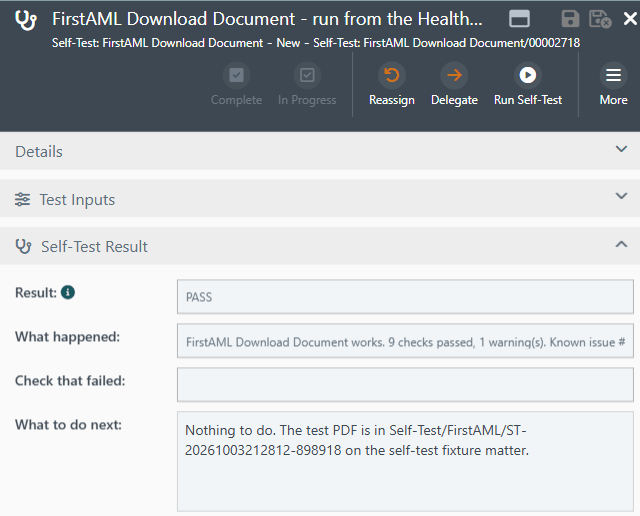
Result, What happened and Check that failed sit at the top of the item.
A PASS means no check failed and the outcome was proved.
Read more: SELFTEST-03, 07
2 · Read
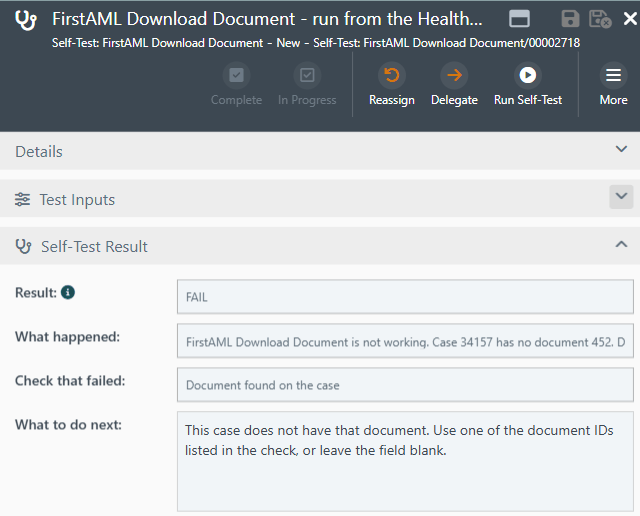
Check that failed and What to do next are plain words.
The download checks are SKIPPED. Nothing was downloaded.
Read more: SELFTEST-05
2 · Read
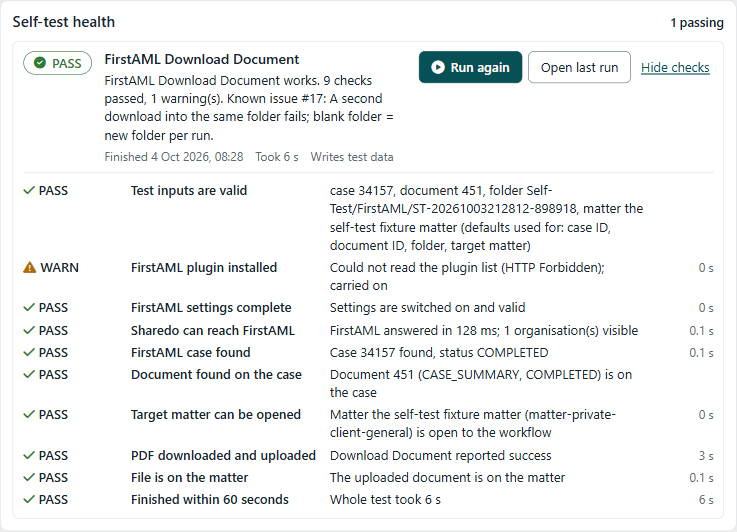
One row per self-test. Show checks lists every check and its time.
Read more: SELFTEST-16
2 · Quick check
We cannot say it is broken. An extra look was refused: WARN. If checking the result is refused: ERROR.
Read more: SELFTEST-06
Module 3
For client IT and support.
3 · Run
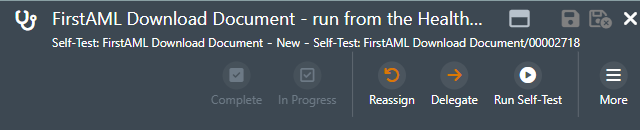
Only IT and support roles run self-tests. Their team must read the test matter, or the result is ERROR (slide 30).
Read more: SHA-001-26 · SELFTEST-23
3 · Run
PASS Nothing to do.FAIL Follow What to do next.ERROR No conclusion. Send the run reference to support.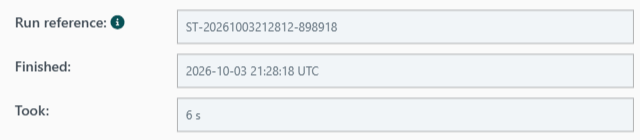
WARN? Read its detail.Read more: SELFTEST-05, 08
3 · Run
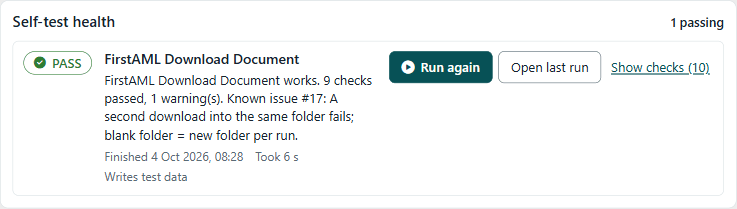
Writes test data tells you this test changes data.
Read more: SELFTEST-16
3 · Run

Release, plugin upgrade, configuration reload.
It changes data. Fixture only, outside production, unless the client has approved it in writing.
Read more: SELFTEST-22
Module 4 · builders
The runbook, step by step.
4 · Build
alt-test-
| Type | alt-test-<area>-entity-<capability> |
| Workflow | alt-test-<area>-wf-<capability> |
| Inputs form | alt-test-<area>-form-<capability> |
| Register field | alt-test-shared-ff-latest-<capability> |
A test that changes data sets dataChanging: true.
Read more: SELFTEST-17
4 · Build · step 0
| Base type | alt-test-shared-entity-base |
| Result form | alt-test-shared-form-selftest-result |
| Fixture | [TEST] Self-Test Fixture |
| Register | one work item |
| Board | Health Board on Tests |
Set the base’s aspects before any child type exists.
Read more: SHA-001-26 step 0
4 · Build · step 1

knownIssues.Read more: SHA-001-26 step 1
4 · Build
{
  "schema": "alt.selftest.result/1",
  "verdict": "FAIL",
  "failedCheck": "document-found",
  "runRef": "ST-20261003105249-398033",
  "checks": [ {
    "id": "document-found",
    "title": "Document found",
    "category": "Contract",
    "status": "FAIL",
    "detail": "...", "ms": 0
  } ]
}
Same JSON for every self-test. One board reads them all.
Read more: SELFTEST-04
4 · Build

Read the outcome back.
Fixed words. Raw errors go to the log.

Errors still write a full ERROR.
A known bug must not stay red.
Read more: SELFTEST-09..12
4 · Build · step 5

Before publishing
[ ] in help text
Modeller
Blade ribbon
IT roles; check it
Everything
Read more: SHA-001-26 step 5 · SELFTEST-21, 23
4 · Build · access
Runners
Every test type
Finds the team
Adds the team
Team reads it
Check: npm run selftest:access -- --tenant X. Fix: add --apply.
Then press the button as a real runner.
Read more: PRAC-008 · AILES-119 · AIMETH-023
4 · Build
| API save | Draft only. Publish. |
| API create trigger | May not fire. Use a button. |
| Tasks open as a blade | Use the Blade ribbon. |
| Search | Cannot see test items. |
| <Angle brackets> | Stripped. Use [ ]. |
Read more: Pitfalls
Module 5 · builders
A wrong verdict is worse than none.
5 · Prove
Wrong verdicts, leaks, crashes
Placeholders, $model.
Permissions, caches, compile
Unhandled shapes, leak paths
Report each layer on its own. Never just “tested”.
Read more: SELFTEST-18..21
5 · Prove · layer 1
PASS.FAILs.WARN. Proof refused: ERROR.Read more: SHA-001-26 step 3
5 · Prove · layer 2
$model. text.Read more: SELFTEST-19
5 · Prove · layer 3
Must PASS.
Must FAIL, naming the expected check.
Record both run references. Then open the item and the board yourself.
Read more: SELFTEST-20
5 · Prove · layer 4
First review, before any tenant.
Review again after live fixes.
Including the reviewer’s summary.
Read more: SELFTEST-21
5 · Quick check
No. Publish it. Run the live check: one PASS, one deliberate FAIL. Look at the item. Get an automated review of the latest code.
Read more: SELFTEST-20, 21
Close
alt-test-, one button
One per failing check
Every FAIL, leaks, throws
Published: PASS and FAIL
Result shows, review done
Read more: Checklist
Resources
